
If your parcel tracking says it was processed yesterday, does that tell you where it is today? Not necessarily. A tracking number gives you a history of recorded events, not a continuous view of the parcel's journey.
The useful question isn't just where your parcel is. It's what the carrier has confirmed, when that happened, and whether you need to act. That distinction helps you avoid mistaking a quiet tracking page for a lost parcel, or a convincing delivery message for a genuine update.
Table of Contents
- What an Australian Tracking Number Is
- Where to Find Your Tracking Number
- How to Check Your Parcel Step by Step
- Reading Status Stages and Scan Timing
- Missing Scans, Delays and Lost Parcels Compared
- When and How to Escalate a Late Parcel
- Spotting Fake Tracking Messages and Links
- Confirm the Status Before You Act
What an Australian Tracking Number Is
Say you're waiting for a gift sent from Melbourne to Brisbane. The tracking page shows that the carrier accepted it, then processed it at a facility. Those entries confirm checkpoints, but they don't tell you which road the parcel is travelling along now.
A tracking number is the carrier's reference linking a parcel to its scan history, from lodgement and processing through delivery attempts and completion. It isn't a live GPS feed. Australia Post delivered 514.3 million parcels nationally in financial year 2024–25, according to its annual report, which shows why individual shipment references matter across such a large network.
Keep the carrier with the number
There's no single tracking-number format for every Australian service. For Australia Post's domestic letter-with-tracking products, the documented sequence number contains nine digits, according to its imprint specifications guide. That product-specific rule isn't a format guide for every parcel or courier.
Save the reference as text, particularly in Excel, so leading zeroes don't disappear. Keep the issuing carrier's name beside it rather than guessing the carrier from the number's appearance.
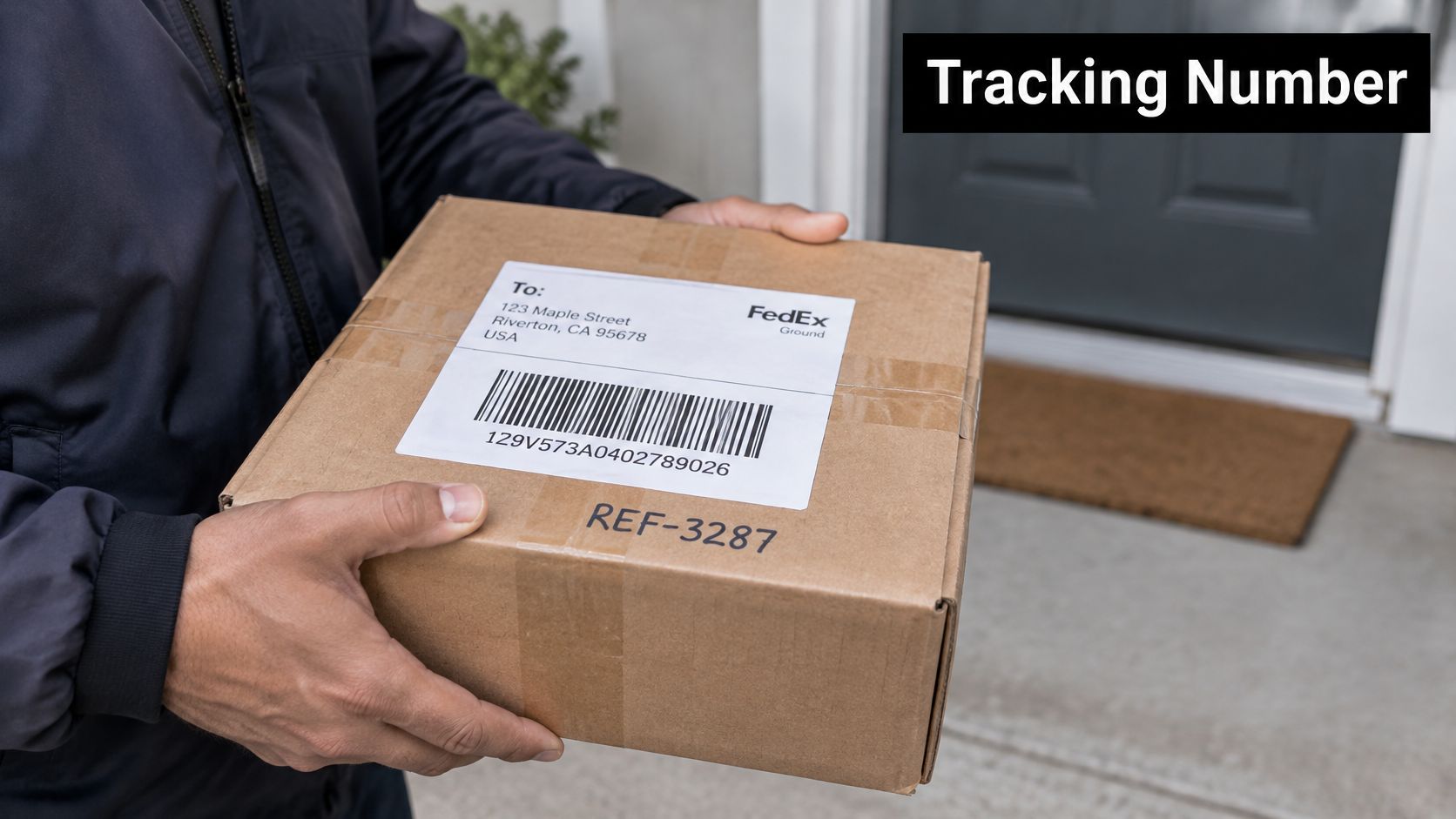
A parcel label connects the physical package with its shipment record.
For retailers handling stock from different owners, PuppetVendors' resource on shipping for consignment stores provides useful context for organising dispatch alongside consignment records.
Practical rule: Keep the tracking number, carrier and order reference together, but don't treat them as interchangeable.
You now have the starting distinction: the number identifies a scan history, it doesn't reveal a continuous location, and it's the reference to check before asking anyone to investigate.
Where to Find Your Tracking Number
| Source | What it contains | How to use it |
|---|---|---|
| Shipping confirmation email | Carrier name and tracking number | Enter the number on the carrier's own website or app |
| Printed parcel label | Barcode and matching number printed beneath it | Read the number under the barcode and check it matches the email |
| Booking confirmation or account dashboard | Booking reference, pickup reference and tracking number | Open the shipment record; the booking reference is not the tracking number |
| Retailer order page or dispatch message | Tracking number, sometimes as a link | Copy the number and track it on the carrier's site after checking the domain |
Start with the dispatch confirmation, not just the message confirming your purchase. An order acknowledgement may arrive before the retailer has prepared the parcel or assigned its tracking reference.
If you're the sender, open the individual shipment record rather than copying a reference from a payment receipt. For an order packed into separate boxes, check which parcel each reference belongs to.
Read the label carefully
A label barcode does more than make the printed number scannable. Australia Post's Domestic Parcels Guide explains that parcel barcodes can contain routing information, and a Smart Barcode can include a Delivery Point Identifier, a reference for a particular physical delivery address.
Check the number beneath the relevant tracking barcode against the dispatch email. Labels may contain several references, so don't assume every barcode or printed code opens the same tracking history.
Address quality matters too. When preparing a label, use black print on a white background, retain the complete address and avoid shrinking or truncating the address block.
Copy the tracking reference, not the booking reference
A booking or pickup reference identifies an arrangement or collection request. The tracking number identifies the parcel's recorded journey. Giving support the wrong reference can make an otherwise straightforward enquiry harder to locate.
- Copy exactly: Check for added spaces, line breaks and hidden characters from copied text.
- Preserve zeroes: Avoid pasting the reference into a spreadsheet cell formatted as a number.
- Resolve mismatches: If the email and label disagree, ask the retailer or carrier to confirm the correct tracking reference before relying on either.
How to Check Your Parcel Step by Step
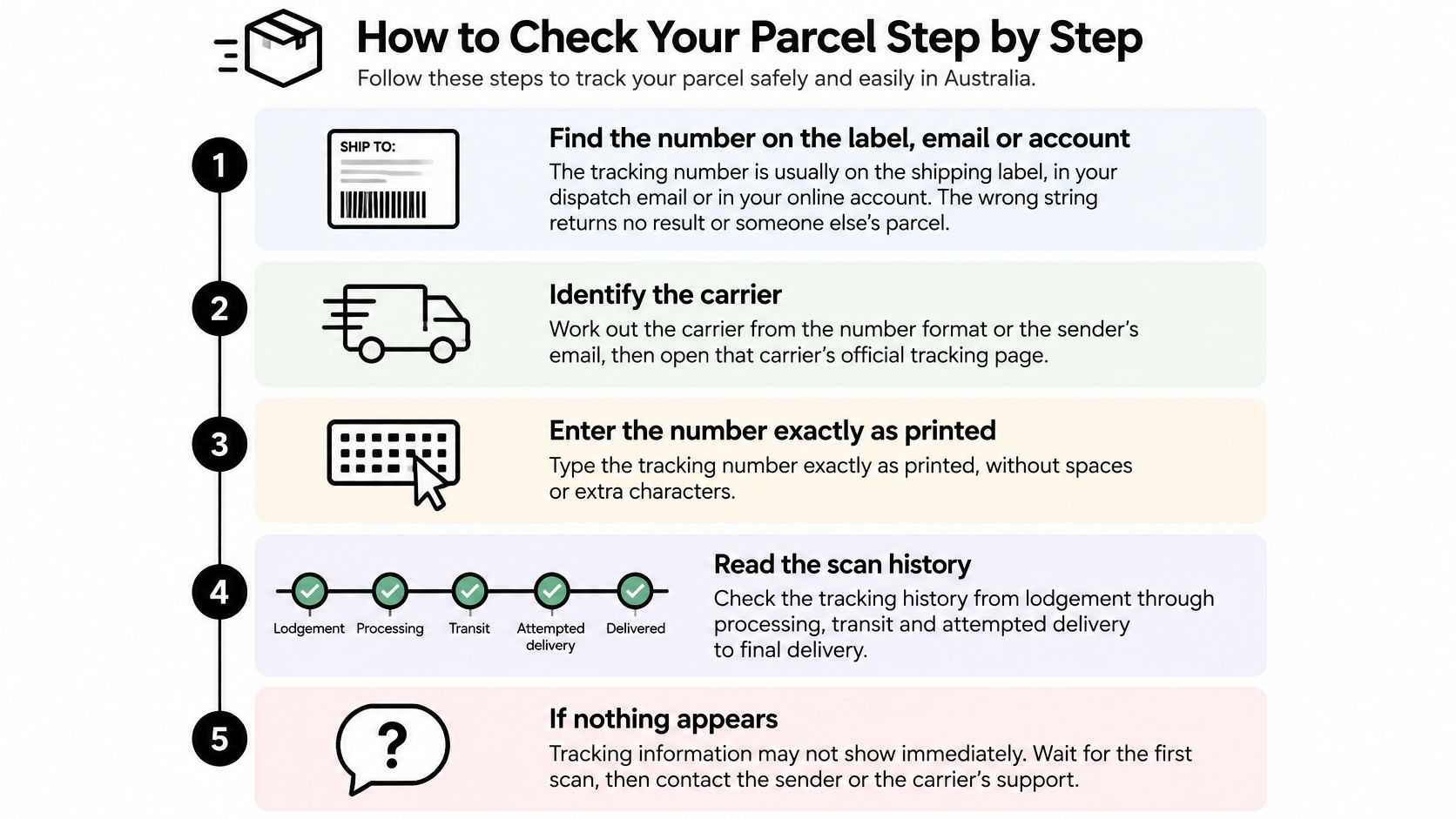
Use the carrier named on the dispatch record rather than a search result promising to track every parcel. The aim is to reach the right shipment history without introducing a copying error or following an unsafe message link.
Locate the tracking number. Use the label, shipping email or individual shipment record. Don't substitute the shop's order number because it's easier to find.
Identify the carrier. Read the carrier name on the label or confirmation email. A similar-looking number isn't enough to identify the network, and entering it into the wrong tracker can return no result.
Open the official website or app yourself. Use a saved app or carefully type the carrier's website address into your browser. Avoid using an unexpected text message as your route to the tracking page.
Enter the reference exactly. If the tracker rejects it, compare the pasted text with the original before trying again. Check the beginning and end for extra spaces, and make sure no characters disappeared during copying.
Find the newest recorded event. Read its date, time, location and event description together. Don't assume the top entry is newest, because interfaces can present histories in different orders.
Compare the event with the delivery estimate. Decide whether the parcel is progressing, awaiting its first acceptance scan or already overdue. Save the relevant details if you'll need to enquire.
The visual guide summarises the main tracking actions.
Keep dispatch and tracking connected
If you're preparing a shipment rather than receiving one, our guide to how to post a parcel helps you organise the preparation and handover steps. Retain the dispatch record so you can distinguish preparation from carrier acceptance.
Retailers should also make the customer's order record easy to reconcile with the carrier's history. IllumiChat's guide to Shopify order tracking is a useful companion for understanding that customer-facing workflow.
A healthy tracking history has clearly dated events that make sense in sequence. It doesn't need a constant stream of updates to be useful.
If nothing appears, first confirm the reference and carrier with the sender. Repeatedly entering the same unchecked number won't establish whether the parcel has been handed over.
Reading Status Stages and Scan Timing
| Status | What it means | What it does not prove |
|---|---|---|
| Label created | Label generated and linked to the tracking number | That the parcel has been collected |
| Carrier accepted | Carrier has scanned the parcel into its network | That it has already departed for the next checkpoint |
| In transit | Parcel recorded at a processing or transport checkpoint | That the delivery date is confirmed |
| Attempted delivery | Courier recorded an attempt to deliver | That the recipient received the parcel |
| Delivered | Final delivery scan recorded | Who received it or where it was left, unless the carrier record shows those details |
These are useful general stages, not guaranteed wording across all carriers. Read any explanatory text attached to the event, particularly where the carrier provides collection instructions or a delivery exception.
A label or consignment reference alone doesn't confirm a pickup booking or physical collection. If the history contains only label information, look for evidence of handover before treating the parcel as underway.
Read the event time, not just the status
Tracking may update after an event takes place. The time you notice an entry isn't necessarily when the courier performed the action, so distinguish the event timestamp from the moment you refreshed the page.
Compare dates with the service's business days and any stated acceptance cut-off. For example, a parcel prepared after a collection cut-off shouldn't be treated as though it entered that day's scheduled movement merely because a label exists.
Carriers don't always display every stage. A short history might contain lodgement, processing-facility and delivery events without a separate entry for every vehicle transfer.
Interpret the final delivery stage
An in-transit event doesn't automatically mean the parcel is on a local delivery vehicle. Our explanation of last-mile delivery describes that final movement towards the recipient.
Likewise, an attempted-delivery event needs its accompanying instructions. The relevant action may involve collection or another delivery arrangement, rather than waiting at the address again.
A status records the last confirmed event, not everything happening at this moment.
Missing Scans, Delays and Lost Parcels Compared
A blank stretch in the history can be frustrating, but it isn't enough to diagnose a lost parcel. Separate a scan gap, a delivery delay and a potentially missing item before deciding what to do.
A scan gap before the expected date
The delivery estimate hasn't passed, but there's no new entry. The parcel may be travelling between recorded checkpoints, or the next event may not yet be visible.
- Signal: The latest event is unchanged, while the expected delivery date is still ahead.
- First action: Save the current details and recheck later rather than assuming the parcel has stopped.
A parcel that's late but progressing
The expected date has passed, yet newer events show processing or onward movement. That's evidence of a delay, not evidence that the carrier has lost all visibility.
- Signal: The history advances after the delivery estimate.
- First action: Monitor for revised instructions or a new estimate, and prepare the shipment details in case an enquiry becomes necessary.
A parcel that may need investigation
The parcel is overdue and the record remains unchanged. That combination deserves closer attention, but stale tracking alone can't establish genuine loss. A carrier investigation may be needed to determine what happened.
- Signal: No fresh event appears as the parcel remains overdue.
- First action: Check the applicable enquiry timing and gather evidence, rather than declaring the item lost.
Read the full history chronologically. A processing event displayed below an older lodgement entry may be easy to overlook if you expect the newest scan at the top.
Concern is a reason to check carefully. The event history and delivery estimate determine the next action.
A quiet day doesn't establish loss, just as a reassuring status label doesn't establish on-time arrival. Use the available signals together.
When and How to Escalate a Late Parcel
| Situation | Wait before enquiry | Action |
|---|---|---|
| Standard Australia Post domestic delivery | Use the domestic enquiry threshold stated below | Lodge a late-item enquiry when eligible |
| Essential medication | Contact earlier than the standard threshold | Contact the carrier as soon as the delay is known |
| Interstate or international parcel | Apply the carrier's relevant domestic or international service terms | Check the applicable enquiry process before lodging |
For most domestic deliveries, Australia Post's tracking support guidance advises waiting until 10 business days after the expected delivery date before lodging a late-item enquiry, with earlier contact recommended for essential medication.
That isn't a universal threshold for every courier. Interstate shipments are domestic, but the relevant carrier and service still matter; don't apply Australia Post's domestic advice to another carrier or an international parcel without checking its terms.
Australia Post also explains that parcels can move between checkpoints without a visible update. A quiet tracking history before the enquiry threshold isn't, by itself, a reason to assume the item has disappeared.
Prepare a useful enquiry
Gather the information a support agent needs to identify the parcel and assess its history.
- Shipment identity: Tracking number, carrier and service, if known.
- Last confirmed event: Its date, location and status.
- Delivery details: Expected delivery date and complete delivery address.
- Supporting records: Proof of dispatch or purchase and relevant correspondence.
Then lodge the enquiry through the carrier's official support process. Describe the problem plainly: give the tracking reference, identify the last confirmed scan and ask for an investigation or confirmation of the next required action.
Keep the enquiry reference and a copy of what you submitted. Ask how the carrier will provide an update, rather than expecting an immediate finding of loss.
Keep investigation and cover separate
An enquiry establishes what happened; a claim concerns any applicable cover and its conditions. Keep packaging descriptions and purchase records available, and review our guide to courier insurance if cover may become relevant.
Don't expect an enquiry to guarantee compensation or immediate recovery. The practical outcome is a recorded case, a reference to retain and a follow-up through the carrier's process.
Spotting Fake Tracking Messages and Links
A text says your parcel couldn't be delivered and asks you to pay a small fee to release it. It includes a tracking number and familiar branding. Neither proves the message is genuine.
Pause before opening a delivery link, even when you're expecting a parcel.
Australia Post's scam alerts guidance says 73% of surveyed respondents had received fake delivery or package scam messages and explains that it has begun removing links from many tracking SMS notifications.
Verify outside the message
Open the carrier's official app or type its website address yourself. Enter the reference there, then compare the actual shipment history with the message's claim.
A real-looking tracking number can be copied or fabricated. Even a reference that returns a result doesn't authenticate the person who sent you the message.
- Payment pressure: Treat an unexpected release fee or redelivery payment request cautiously.
- Personal-detail requests: Don't provide identity or card details through an unsolicited tracking link.
- Unfamiliar domains: Check the actual destination, not just a carrier logo or sender display name.
- Urgency: A threat that your parcel will disappear unless you act immediately deserves independent verification.
Use the same pause-and-verify approach when viewing delivery messages on your phone.
If you've already entered financial details, contact your bank promptly and explain that you may have used a phishing page. Report the message through the carrier's official channels, and change any password you disclosed or reused.
Confirm the Status Before You Act
When searching for a tracking number in Australia, the most useful result is a clear decision about your own parcel. Start by matching the carrier and reference to the dispatch record, then choose an action supported by the latest event.
Keep these identifiers separate when you contact support.
| Term | What it identifies | Where you see it |
|---|---|---|
| Tracking number | The carrier's reference for one parcel's scan history | Label, shipping email, carrier site |
| Booking or pickup reference | A booking or collection request | Booking confirmation and account dashboard |
| Label barcode | Machine-readable data used in sorting | Printed parcel label |
| Delivery Point Identifier (DPID) | A unique reference for a specific delivery address | Smart Barcode labels where supplied |
| Scan event | One recorded checkpoint in the parcel's journey | Carrier tracking history |
Match the next action to the evidence
- Only label information appears: Confirm that the sender handed the parcel over. If a collection was missed, we can take a pickup rebooking request using a shipment selection or tracking number.
- The parcel is progressing: Check whether the expected delivery date has changed and whether the carrier requires anything from you. Don't lodge duplicate enquiries because an older event remains visible.
- Attempted delivery appears: Check the latest courier update in Tracking and follow the courier's instructions for the selected service. Collection or redelivery arrangements must match those instructions.
- Delivered appears, but you can't find it: Check the recorded delivery location, any available delivery evidence, building reception and safe places. Ask household members and neighbours before reporting that the delivery can't be located.
- The parcel is overdue without progress: Check whether the carrier's late-item enquiry threshold has been reached. Measure that threshold from the expected delivery date where the carrier requires it, not merely from the age of the last scan.
- A message demands payment or personal details: Leave the message untouched and verify the shipment independently through the carrier's official website or app.
A delivered event deserves particular care. It records completion in the carrier's system, but any available photo, signature or location note helps you understand what that completion involved.
Give support a precise question
For a missing delivered parcel, ask the carrier to review the delivery evidence and location. For a missed collection, identify the booking and request the appropriate pickup action. Those are different problems and shouldn't be described as tracking not working.
Businesses reconciling customer orders with delivery records may find Doczen's explanation of how POD connects to EDI useful for understanding the relationship between proof of delivery and electronic shipment records.
For questions about a shipment arranged with us, email save@sendaparcel.com.au with the relevant reference and a concise description of the issue. Include what you've already checked so the enquiry starts with the facts.
Open the carrier's official tracking page, read the newest dated event, and take the action that matches it.
Sendaparcel offers Australian courier comparison, booking tools, labels and shipment tracking for personal parcels and business orders. Visit to compare available services for your route and keep your shipment records together, so you can find the right reference when a parcel needs attention.